Monday, December 31, 2012

coming to an end of 2012

A self reflection??!! I just remembered to write about the sous vide stuff with Arduino. (BRING ON THE YUMMEH) DIY arduino Sous vide shield + code + cooking + ACTION
close up shot
The setup. I am using my HTC desire phone charger to power on the system instead. When i am using my 12V 1A DC supply from the wall, the temperature reading is way crazy. SUPRISE!! I am getting readings with very wide fluctuations. The LM35 is power by the 5V from the arduino. I suspect is the onboard voltage regulator might be giving way, but no way to verify because I do not have a digital multimeter with me now. When development was done, it was supply with 5V USB from a laptop. It is important to test your system with both the intended supply and also the USB supply. sous vide lamb shoulder 57degC for 24hour.
sous vide beef brisket 75 degC for 24 hour
Details of making this shield, check out the instructables by my padawans (keyou + suan) Instructables Here code here

Thursday, October 11, 2012

repartition disk ubuntu 12.04 in vmware with GParted

I was playing with my linux and unix VMs (vmware workstation 9) to setup for my lab environment, for the purpose of my lab session. I am surviving with only my dell XPS which runs on win7 Enterprise :( While playing setting up, there were 2 main obstacles that made me a "dumbledore"  moment.

In this session, I shall highlight the guide to solve one of the obstacles. The other is with wxwidget, which I will cover soon.

When I was creating a VM for ubuntu 12.04, at the option to select disk space, I only create a VMDK of only 4GB. This is because I am trying to save on the HDD space on my dell XPS. Installation went well, until i booted up and start to compile and run my code. To my horror, my free space in ubuntu is left with 127MB, that is after several sudo apt-get of the necessary software. A quick df -h showed me the details of the HDD space use.  Therefore, I need to increase the VMDK size (by 1GB hahaha... I am damn ngiao[petty] OK!).  

Few steps to complete this.
1. Power off the guest OS VM (e.g Ubuntu 12.04). 
2. Change the Hardware setting of the VM to XXX GB (as required).
3. Download GParted iso (opensource disk utility) on the host OS.
4. Power on guest OS VM
5. mount 3. 
6. restart ubuntu 12.04 (click shutdown from dashboard, in the popup on the LHS, there is a restart)
7. while rebooting press F2 on the vm boot sequece to go into the pseudo bios scree.
8. change the boot sequence by moving CD Rom to the top (it contains the GParted) and save before exit
9. continue to boot as usual and you will be greeted by the GParted GUI (unless you have choosen otherwise during the startup dialog)
10. Use GParted to resize the partition and then reboot

the dumb moment..... I am trying to make sense out of the google research I did on using GParted at step10. None of the results user guides are detailed enough to help a layman (e.g me) to use it. After some experimentation based on the steps given by others and recalling my prior experience, I managed to deduce the steps to assign the unallocated space created from VM workstation and resize it to be larger.

**Rules of thumb: Never delete the boot partition on the LHS. Always compact the partition on the RHS of the boot partition by 1.Delete partition (s) to the RHS of the boot partition. 2. Combining unallocated space. 3. Resizing of boot partition will always take the unallocated space from the RHS of the boot partitition. 

Explore the partition information. In this screenshot from my VM, my unallocated is at the extreme RHS, which is not sequentially next to the boot partition. 


Right Click on linux swap partition, then click on information. Check that partition is swap-off (e.g the swap-on option is waiting for you to enable, DO NOT click it). Right click again to delete the linux swap partition (/dev/sda5) and then right click on /dev/sda2 to delete the extended partition. The final output will be the screen above. Note that my unallocated space became 2GB from 1 GB.
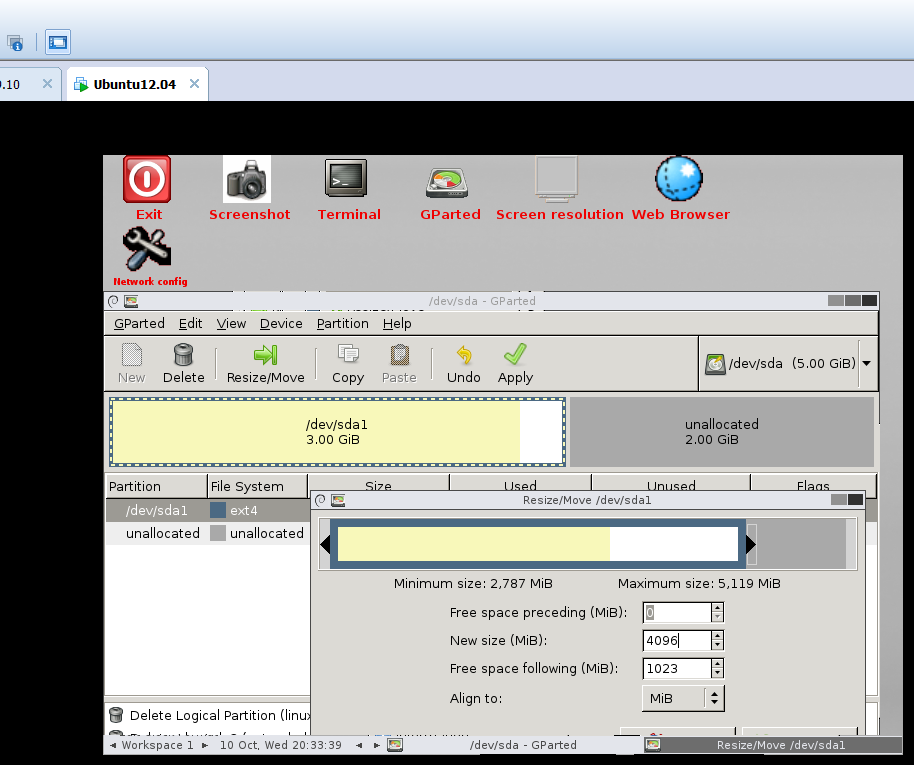
Right Click on the boot partition and click on resize. The popup window appeared to allow adjusting of the hdd size by sliding the vertical bar or changing the new size parameter. I leave 1GB for the linux swap partition. To finalize all the new settings, click on the OK button. 


Next, click on the remaining unallocated space and assign it to be extended partition, such that logical partition can be created in it. Review the lower window on the actions to be executed. Once finalize click on the apply button.


Fingers crossed.....


Reboot to guest OS and double check the size of the partition by issuing sudo fdisk -l


Monday, October 8, 2012

Back to School: Java OOP Challenge

Alright guys, in another 1 week time it will be Back to School!!! Exited? Sad? Holidays are too short? forgot what that was taught last semester?

Well, it is always good to keep your practical skills honed, especially those that you need in the new academic semester. *make a guess, what skills are important?  I have this hypothesis that my tech skills will suffer from deterioration over the LONG holidays IF i do not use them. Therefore, I always look for / create some opportunities to make use of my skill set.

I have taught programming Java1 and Java2, and C++ over the last few semesters. I really hope you guys still remember what it takes to write a proper piece of code to solve a certain problem/situation/scenario. Now, I am going to give you guys a head's up before the school starts and hopefully to prevent the whole "new" process of running amok and panicky to learn back on what has been taught and practiced. 

The terms remained the same as per the last challenge. Trust me, the 3 weeks of wait for postage will be not in vain. Hey, you got something from => ME!

The first 3 SP students that responded with your OWN thoughts that were translated into code shall get a post card signed by yours truly and sent via snail mail from London, UK. You need to do a POC (via snipt.net, paste on my Facebook post) + FCFS only.  
If you are a year1 sem2 student or year2 stage B student (minimal programming experience) that attempt at this question and manage to complete it, drop me a message. I will make sure you will get some goodies sent from London!

Now, the question statements

Using OOP concept, design the classes and create a "cmd prompt style" calculator that does the basic operation, e.g add, substract, multiply, division, and with the proper exception handling. The user need to be able to enter this expression "a + b" to operate the software. Next, using the same OOP concept create a ScientificCalculator that adds a new feature of calculating a power to an integer, e.g x^m. Use any language of your choice, Java, C++, Python, etc


the source code is for reference only. You are strongly encourage to write one with your own thoughts (to claim the prize of course!).


Friday, October 5, 2012

Liquid Nitrogen made my Ice cream~~~~

Sunday, September 30, 2012

sous vide ala ghetto

I have been cooking ala sous vide for the last few days, using my ghetto setup.
 breakfast, eggs on toast. eggs sous vide at 63degC for 45min. cooked in a batch and then kept in freezer.

Lunch is too expensive, It will cost at a minimum about GBP10.... so I am skipping it. Just to give a matter of perspective, 300g of pork chop is GBP1.79


Dinner. Usually I would Sous vide the meat and later chill it in the fridge. After I am back from school, i would pop some into hot water bath . Once it is properly warmed to the desired temperature, in it goes to the hot skillet for the malliard reaction. 

Sous vide chicken thigh at 71degC for 2 Hr

sous vide pork chop at 57degC for 2Hr

Tefal frying pan is awesome!~


Watch out this space for sous vide beef rump (GBP1.99) and also bacon joint (GBP2.39)!